I can set up subscriptions with my clients and let it run without checking in on it constantly. It even rebills if payment fails.
Subscriptions Subscription billing that stays easier to run.
Create and sell recurring offers with free or paid trials, flexible billing frequencies, automated failed-payment recovery, customer self-service, and reporting that helps you keep recurring revenue healthier over time.
Try Spiffy risk‑free for 30 days.
Launch and sell
Sell subscriptions where buyers are ready.
Start with free trials, paid trials, or immediate billing. Then sell the same recurring offer in checkout, through add-ons, or inside one-click upgrade flows without rebuilding everything each time.
Free and paid trials built in.
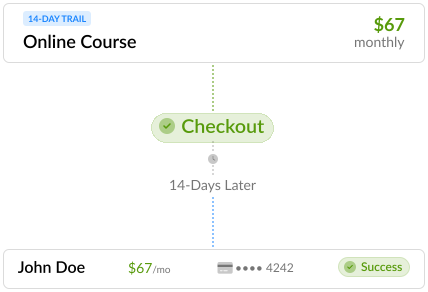
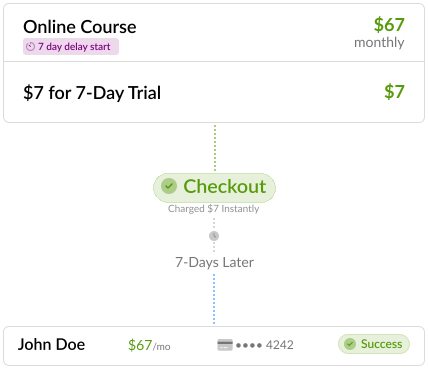
Delay the first charge, charge for the trial period, or start billing right away from the same subscription setup.
14-day free trial
$7 for 7 days

Sell subscriptions in checkout, upsells, and add-ons.
Present recurring offers during the first purchase, add them to the checkout flow, or use one-click upgrades to move buyers into a better-fit offer after the sale.
Flexible billing frequencies.
Build offers around the way you want to charge, whether that is weekly, monthly, quarterly, or annually.
Weekly
Monthly
Quarterly
Annual
Send people into the right follow-up automatically.
Trigger the right onboarding or follow-up based on the subscription or billing choice someone makes.
- Apply tags or add people to the right list
- Start onboarding for a specific plan
- Send annual subscribers into a different follow-up path
- Pass purchase actions into connected automations
Billing automation
Keep renewals moving without manual chasing.
Use billing events to respond automatically when cards are expiring, payments fail, subscriptions renew, trials end, or plans change.
Send reminders for failed payments and expiring cards, let customers update their payment method, and use either Spiffy's reminders or your own email campaigns to bring more subscriptions back on track.
See our Billing Events25+ billing events
Respond automatically around renewals, failed payments, trial endings, and subscription changes.
- Failed payment
- Card expiring
- Subscription payment
- Upcoming end of trial
- End of trial
- Subscription canceling
- Subscription canceled
- Plan upgraded
How recovery can play out
- 1Card expiring reminder Give customers a nudge before the next renewal is due.
- 2Payment attempt If the payment fails, the billing event fires immediately.
- 3Failed payment follow-up Send reminders and keep the customer moving toward an update.
- 4Customer updates card Let the customer fix the payment method without back-and-forth.
- 5Subscription keeps going More renewals stay active instead of quietly turning into churn.
Subscription management
Manage active subscriptions without admin mess.
Manage the subscription changes that happen after launch without losing clarity around billing history or customer status.
Customers can handle payment method updates and subscription changes through the Customer Portal when you want to reduce support back-and-forth.
Core management actions
- Plan changes Move people between subscription plans more cleanly.
- Billing date edits Adjust renewal timing when an account needs to change.
- Cancellation options Cancel immediately or at the end of the billing cycle.
- Reactivation Bring canceled subscriptions back without starting from scratch.
- Billing history See payment attempts, retries, and payment method changes in one place.
- Customer self-serve Let customers update cards and manage subscriptions without opening a support ticket.
Reporting
See the subscription numbers that need attention.
Watch the core subscription metrics that help you spot churn risk, trial performance, and revenue movement earlier.
Connect subscription reporting to the wider revenue picture when you need more context. See Analytics.
Subscription dashboard metrics
- MRR
- ARPU
- Subscriber Growth
- Revenue Growth
- Churn
- Trial Success
Revenue visibility beyond the headline metrics
Cash forecasting
See scheduled subscription and payment-plan revenue over a selected period.
Failed payment and aging
Review outstanding balances based on how long a failed payment has been sitting open so follow-up stays focused.
Our failed payments have dropped from 14–19% on monthly subscriptions to a remarkable 3.5%.

If you're looking for a really powerful but easy to use system, I think you can just stop looking right now and get Spiffy. It's that good.

Subscription questions?
Need help planning setup or migration? Get in touch.
What can Spiffy handle for subscription billing?
Can I offer free and paid trials before charging?
Can I change subscription plans and billing timing?
Can customers manage their own subscriptions?
How does Spiffy handle failed payments?
Can I run subscriptions and payment plans together?
Do you support Stripe and PayPal for recurring billing?
Can you help migrate existing subscribers?
Ask about Spiffy on
Run subscriptions with less friction behind the scenes.
Launch subscription billing with trials, recurring payments, billing recovery, customer self-service, and clearer recurring revenue visibility from one connected system.